 pharpend
b680336ba4
pharpend
b680336ba4
======================
NACL mental disability
======================

NACL is mentally disabled and can't be loaded as an ES6 module. That is, it can't be
"imported" using

```js
import * as nacl from './path/to/nacl.js';
```

Instead you have to include it in a page. So we have a page called
`background.html`.

I naively tried this

```html
<script src="dist/jex_include/local-nacl-1.0.3/nacl.js"></script>
```

That of course didn't work because we live in hell.

I initially thought the problem was an invalid hash. No. Notes as I figure it
out:

    Trying to figure out why TweetNaCl isn't loading

    ok so the problem is not an invalid hash, it's something specific
    to nacl

    to have an inline script, its hash must be specified in
    manifest.json

    example (integrity key is not necessary, it is there purely for
    comment purposes)

         beginning of line
        V
        |        <script integrity="sha256-8T3dvQxHPNQvgxzCemw3KGUCM5RhknpCQF6pCcTdFTw=">console.log('bg-test-inline.js line 1!');
        |</script>

    newline is there for hash purposes

    this works if and only if
    'sha256-8T3dvQxHPNQvgxzCemw3KGUCM5RhknpCQF6pCcTdFTw=' is included
    in the manifest.json

    example (top level key):

         "content_security_policy" : "script-src 'self' 'sha256-8T3dvQxHPNQvgxzCemw3KGUCM5RhknpCQF6pCcTdFTw='; object-src 'self'",

    Absent that explicit allow, I get this error from Firefox:

        Content Security Policy: The page’s settings blocked the loading of a resource at inline (“script-src”).

    Refs:
        1. https://developer.mozilla.org/en-US/docs/Mozilla/Add-ons/WebExtensions/manifest.json/content_security_policy
        2. https://developer.mozilla.org/en-US/docs/Mozilla/Add-ons/WebExtensions/Content_Security_Policy#inline_javascript

    If I include the same script as a file,

        <script src="bg-test-inline.js"></script>

    this works irrespective of if I specify it as allowable in the manifest

    nacl is just refusing to load

        Loading failed for the <script> with source “moz-extension://eafd6a74-b75b-4312-9a34-8087b68395e7/dist/jex_include/local-nacl-1.0.3/nacl.js”.

    I initially thought it was a hash problem, but it is not

    TweetNaCL doesn't work as an ES6 module, it works by destructively
    updating the window namespace.  This I think was necessary before
    ES6, and that behavior is retained either because of laziness or
    because of backward compatibility reasons.

    hmm

    so this just plainly doesn't work and i cannot figure out why

        <script src="dist/jex_include/local-nacl-1.0.3/nacl.js"></script>

I think it works if I do it in the popup window instead. Let's try

oh no

no

oh my god

i am so stupid

the problem was that i typed the url wrong

the package is "tweetnacl" not "nacl", and i also need /dist/ too

    <script src="dist/jex_include/local-tweetnacl-1.0.3/dist/nacl.js"></script>

that works

all this time i thought that it was the browser that was mentally disabled

it turned out the mental disability was inside me all along

alright well I discovered a potential future pitfall at least
Jack Russell Extension
This is a browser extension wallet for the Aeternity payment network. It is meant to work in the latest versions of Firefox and Chromium.
How it works
You may want to read about how AWCP and Sidekick work first. Briefly,
- AWCP (Aepp-Waellet Communication Protocol) defines the message protocol
between a page script (the "aepp") and a wallet (the "waellet"). A page
script is something that you include with
<script src="./foo/bar.js"> - Sidekick is a library (for page scripts) of TS/JS function calls that
blackboxes away all of the stupid implementation detail nonsense about how to
actually send and recieve the messages defined by AWCP. For instance, there
is a function call
tx_sign_noprop, where you hand that function a transaction, and the return value is either the signed transaction or an error (for instance, the user rejected the signature request).
JR works in a very similar way to Sidekick, but it has more things that need to talk to other things layers. Browser extensions have 3 basic components:
-
Content scripts. These are almost the same thing as page scripts.
In general, content scripts are typically used to modify websites the end-user is looking at. For instance, if you were making RedBorder, an extension that adds a 15 pixel wide red border around every image, the content script is the part of RedBorder that has the permission to query the DOM for
<img>tags, and modify each such tag to have the propertystyle="border: 15px solid red;".For the purposes of JR, the content script is simply the messaging layer between the page script and the rest of the extension. All that matters in our case is
- the content script can post messages that are visible to page scripts
- vice versa
- the content script has permission to send messages to other parts of our extension (and to other extensions and to desktop applictions and it can eat your children but that doesn't matter)
- vice versa
-
The background script.
This is the central controller of the application.
-
Popup scripts.
This is what a "popup" is in the context of browser extensions:
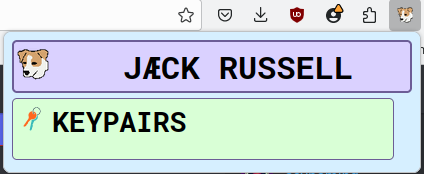
This is an HTML page like any other. A popup script is simply a script that runs in the context of the popup page. It has the same basic array of permissions as the background script.

PAGE SCRIPT  <->  CONTENT SCRIPT  <->  BACKGROUND SCRIPT  <->  POPUP SCRIPT
 Aegora.jp   <->  src/content.ts  <->  src/background.ts  <->  src/popup.ts
In JavaScript, the standard way of communicating between mutually opaque
contexts A and B (for instance, between a page script and a wallet) is to write
a class in each context that manages state, which listens for events, and then
does things in response to those events. ClassA can dispatch events which are
visible to the event listener in ClassB and vice versa. This is the natural
result of trying to shoehorn concurrency into an object-oriented language.
Sidekick and JR internally work by mimicking Erlang's interprocess communication (IPC) idiom.
Erlang is a concurrency-first language, and thus has a much saner and more
well-thought-out approach to this problem. There is a build-in function called
send(PID, Message). The message can be any Erlang term. In the receiving
process, there is primitive syntax for receiving messages:
receive
    Pattern1 ->
        do_thing_1();
    Pattern2 ->
        do_thing_2();
    _ ->
        handle_arbitrary_message()
after NMilliseconds ->
    do_timeout_thing()
end.
Each process has a mailbox. When a process enters a receive, it sits there
and scans its mailbox to find a message that matches one of the patterns. If
it finds a message that matches Pattern1, it executes the function
do_thing_1(), and so on. The after part is optional, and it exists as a
backstop so the process doesn't get stuck in an infinite receive loop.
Here is an example of two processes just exchanging ping and pong:
#!/usr/bin/env escript

-mode(compile).

%% this is the code that is run by the pinger process
pinger() ->
    %% the pinger just sits and waits until a pong message appears in the
    %% mailbox and sends back ping
    receive
        %% wait to receive a pong
        %% only accept this pattern
        {SenderPID, pong} ->
            %% self() gets the current process pid
            %% print out the pong to the console
            ok = io:format("~p received pong from ~p~n", [self(), SenderPID]),
            %% wait for 1 second
            ok = timer:sleep(1000),
            %% send a ping back
            SenderPID ! {self(), ping},
            %% start over
            pinger()
    end.


%% this is the code that is run by the ponger process
%% identical to the pinger except the words "ping" and "pong" have been swapped
ponger() ->
    %% the ponger just sits and waits until a ping message appears in the
    %% mailbox and sends back pong
    receive
        %% wait to receive a ping
        %% only accept this pattern
        {SenderPID, ping} ->
            %% self gets the current process's pid
            %% print out the ping to the console
            ok = io:format("~p received ping from ~p~n", [self(), SenderPID]),
            %% wait for 1 second
            ok = timer:sleep(1000),
            %% send a pong back
            SenderPID ! {self(), pong},
            %% start over
            ponger()
    end.


%% this is the main process
main([]) ->
    %% start up pingers and pongers
    %% these just sit and wait until they are told to do something
    PingerPID = spawn(fun pinger/0),
    PongerPID = spawn(fun ponger/0),
    %% ping the ponger, but lie about who is doing it
    PongerPID ! {PingerPID, ping},
    %% this is a hack so that main doesn't exit and therefore the demo works
    receive
        _ ->
            ok = io:format("bye~n")
    end.
[~] % escript pingpong.erl
<0.81.0> received ping from <0.80.0>
<0.80.0> received pong from <0.81.0>
<0.81.0> received ping from <0.80.0>
<0.80.0> received pong from <0.81.0>
<0.81.0> received ping from <0.80.0>
<0.80.0> received pong from <0.81.0>
<0.81.0> received ping from <0.80.0>
<0.80.0> received pong from <0.81.0>
^C
JR basically thinks of each of the 3 different components of an extension as Erlang processes, and has some band-aid code to kind of sort of mimick Erlang's IPC idiom. Frankly, Erlang's IPC idiom doesn't quite fit into TS/JS, however even the shoehorned band-aid Erlang idiom is significantly simpler and more pleasant to work with than the OOPy event idiom.